 Pro Features
When you link an account to Mailspring, it tries to identify your Sent Mail folder, Drafts folder, and Trash folder using flags provided by your mail provider as well as common heuristics (like the folder’s names.)
Sometimes Mailspring chooses the wrong folders and you won’t see your mail. For example, if you have a “Sent” folder and a “Sent Messages” folder, Mailspring might choose the wrong one and not add emails you send to the correct folder. In this scenario, the correct folders are shown further down in the left sidebar.
To change the folder associations and fix your account, visit Mailspring’s preferences and choose “Folders” in the top bar. You’ll see a list of your accounts and the folders Mailspring is currently using for important folders.
Click one of the existing folders to select a new one:
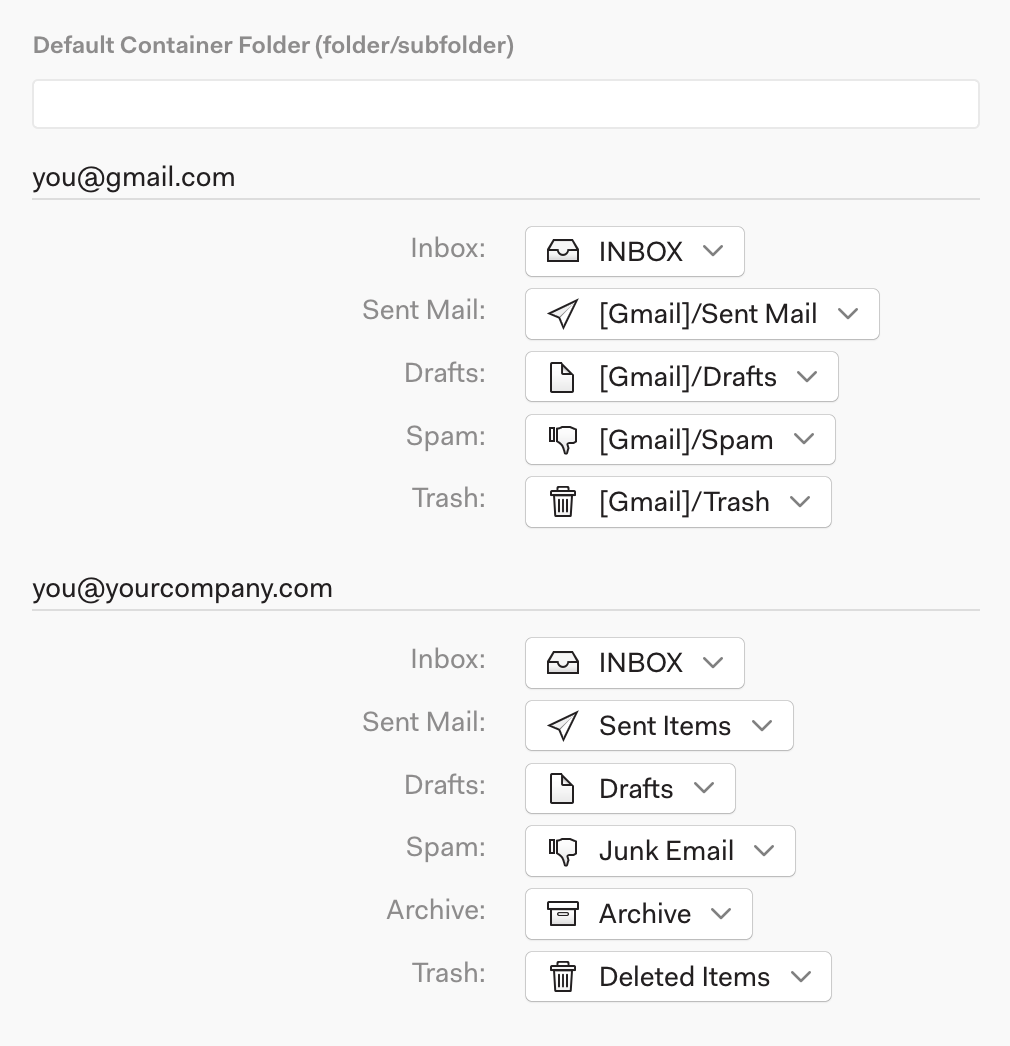
Your changes are automatically saved. Quit and restart Mailspring to ensure your changes are applied immediately.
Gmail: make sure the folder is visible over IMAP
Gmail lets you hide system labels from IMAP clients. If Sent Mail, Drafts, Trash, or Spam is missing in Mailspring, sign in to Gmail in a browser, open Settings > Labels, and check Show in IMAP next to each of them. Then choose Sync New Mail Now from Mailspring's menu.
Still wrong after changing the mapping?
If the right folder is selected in Preferences > Folders but recent sent messages still don't appear, go to Preferences > Accounts, select the account, and click Rebuild Cache.... Mailspring re-downloads the account's folder list and messages from the server; nothing on the server is changed.